
If you are looking for church camp software, you are probably not shopping for software at all. You are trying to stop re-typing the same group into four systems, stop finding out about a double-booked lodge on the morning it matters, and stop losing an evening to a spreadsheet that only one person understands.
The One App is camp management software built for Christian camps and retreat centers. Booking, registration, contracts, billing, housing, meals and the people who do the work all live in one system. Not one login that opens five products — one system, where the booking and the beds and the kitchen already know about each other.
What church camp software actually has to cover
Most software sold to camps does one slice well and leaves the rest to you. Registration software takes sign-ups but knows nothing about which cabins are free. Booking software for retreat centers holds the calendar but cannot tell the kitchen how many are coming Friday. Accounting sits in a third place, the donors in a fourth, and every seam between them is a person re-typing something.
A Retreat Center is not really running four operations. It is running one, and the software should be shaped like the work:
- Guest groups and retreats — inquiries, contracts, deposits, rooming, meeting spaces.
- Programs — what most people call traditional summer camp: registration, payments, Guest communication.
- The property — housing, activity spaces, meeting rooms, what is clean and what is not.
- The kitchen — real headcounts and real dietary needs, not an emailed estimate.
- The money — billing, payments, what is owed and by whom.
- The people — Guests, Guardians, group leaders, donors, and your own Squad.
The One App covers all six, which is the only reason any of it can be automatic.
One calendar for every Program and every guest group
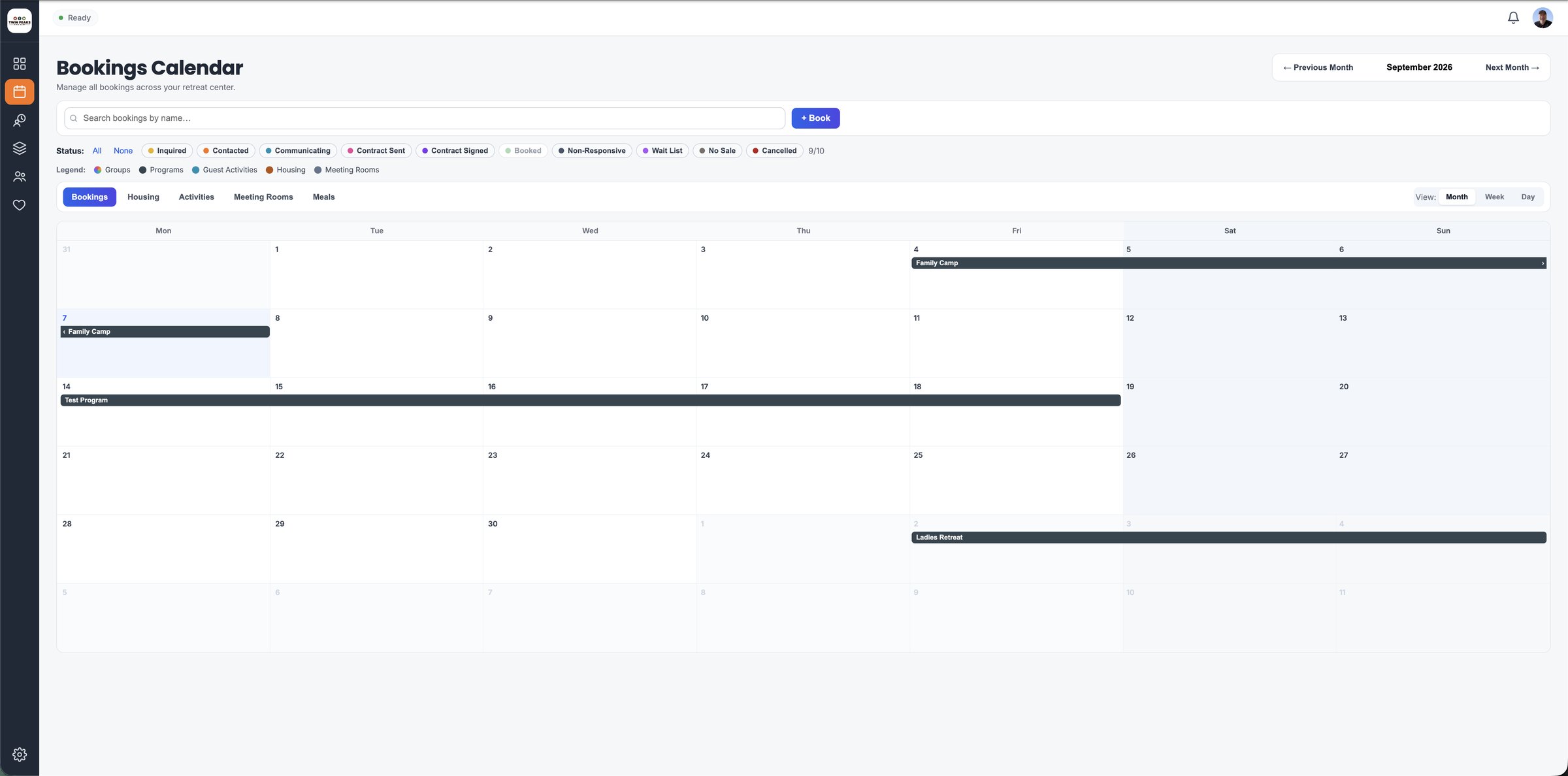
Gone are the days of juggling several calendars. The One App holds your scheduling in one place, which lets you:
- Coordinate guest groups and traditional Programs on the same calendar, so a conflict is visible before it is a phone call.
- See what is actually available — beds, meeting rooms, activity spaces — against what is already promised.
- Change a schedule in real time and have everything downstream follow it.
The Group Card: one place for everything about a group
The Group Card is the command center for a group. Instead of a folder, an email thread and two spreadsheets, everything about them sits on one screen:
- Group contract: managed without an envelope.
- Payments: what is owed and paid for housing, activities and meals.
- Meals: dietary preferences and meal plans, tied to the real headcount.
- Housing: assign and manage accommodation.
- Meeting rooms: schedule the spaces they asked for.
- Activities: organize activities and sign-ups.
- Room assignments: place the members of the group quickly.
When a group leader calls, you open one thing.
The Group Pathway: the group does its own registration
The Group Pathway hands a group control of its own registration while keeping you in the loop. They sign their documents, set up their own pricing and collect their own money.
- Electronic signatures: no more paper contracts.
- One-click contracts: a group leader signs in a single step.
- Flexible pricing: a group sets up its own pricing and payment plans.
- Unified registration: a group registers with the Retreat Center and with its own organization at once, rather than twice.
- Document upload: a group uploads its own organizational documents to be signed electronically.
That is the difference between chasing a group for eight weeks and watching the contract come back signed on a Tuesday.
The Camper Portal: for group leaders and the people attending
The Camper Portal gives group leaders and Guests the tools to stay organized and connected:
- Create an itinerary: a group leader builds and shares their own schedule.
- Manage registrations: handle a group’s registrations from one dashboard.
- Interactive camp map: so nobody has to ask where the dining hall is.
- Messaging: no more mass emails or group texts — message the group directly.
- Payments: a group leader can accept payments on behalf of their organization.
Registration oversight, capacity and timing
Tracking registrations for individual Guests and for whole groups happens in one view. From there you can see every registration on one dashboard, stay current on both group and individual entries, and cut the errors that come from reconciling two lists by hand.
Capacity is handled the same way. Set ticket quantities against your real capacity, watch attendance as it fills, and adjust availability as demand moves — so an Event runs the way it was planned and nobody is overbooked into a building that holds forty.
Timing runs itself. Define the exact dates registration opens and closes, and the windows open and close on their own. That is one more reminder you do not have to set.
Assignments: housing, meeting rooms and activities
Allocate rooms, meeting spaces and activities without friction. Manage housing arrangements and activity sign-ups, give clear instructions so there is no misunderstanding at the door, and update an assignment from your phone when the plan changes at four in the afternoon — which it will.
A welcome that lands before anyone arrives
First impressions count, and most of them happen before a bus is parked. Through the registration pathway, a group leader can record a personalized welcome video, share the announcements and the schedule, and build a sense of belonging while people are still packing.
Ask Al, the assistant that can actually answer
Ask Al is built into The One App and helps with housing assignments, meal planning and activity scheduling. It can answer because the information is already in one place — an assistant that can only see registration cannot plan a day at a Retreat Center.
More than one property
If you run several sites, you oversee them from one platform rather than one login per property, with the same calendar, the same contracts and the same numbers in front of you.
Sixteen apps, retired
The Retreat Centers we work with — including Bear Paw Camp, Bongiorno Conference Center, Camp Maranatha, Barefoot Republic and Hume New England — typically remove sixteen different apps from their operation when they move onto The One App.
That consolidation saves money and removes a great deal of frustration. But the thing they mention first is the time it gives back, and where it goes: to the people who came.
Why all-in-one only works if it was built that way
Plenty of platforms say all-in-one. The question worth asking a vendor is whether the pieces were built together or bought separately and wired up afterwards, because that decides whether the kitchen count updates when a group cancels — or whether somebody has to remember to tell it.
The One App was engineered as one system, not assembled out of parts. That is why the contract, the beds, the meals and the invoice are the same fact seen from four directions instead of four records that have to be kept in agreement by hand.
See it on your own camp
The fastest way to judge church camp software is to watch somebody run your own groups through it. Take a free tour — thirty minutes, your property, your questions, and we set it up for you.
Visit theoneapp.camp or call (833) 409-0033. A person reads every message at support@theoneapp.camp.