Camp software engineered as one system, not assembled out of parts. See why one app wins ›
The One App by Camp Connection
Communication

Communication

The One App on a phone — Communication

Finally, one app for the entire camp.

Camp and retreat center software

The One App holds the whole operation — every booking, every dollar, every bed, every meal, every donor. Then it does the part nobody else does.

It brings you the answer
instead of making you go find it.

We will set your camp up for you. Then it is free for fourteen days with your own camp already in it. No contract.

Built by camp people. Decades in Christian camping. One system. No modules, no add-ons. Patent pending.

How it does that

Built as One,
from the Ground up.

Bookings, registration, billing, the kitchen, housekeeping, the store, your donors — and your phone line. Not integrated. Built as one.

No risk, no pressure

See your own camp in it.
Then decide.

Thirty minutes on a call. Send us your data, we set your account up for you, and you have fourteen days with your own camp already in it — nothing to sign, nothing to cancel.

  • We load your data
  • 14 days free
  • No contract
  • No credit card

Thirty minutes, an honest answer, and if we’re not right for you we’ll say so.

The way it is now

You didn’t get into camp
to do data entry.

The registration system doesn’t talk to the accounting system. The kitchen count is on a whiteboard. Housekeeping runs on a clipboard. And every number gets typed in twice before anyone trusts it.

Meanwhile the people you got into this for are outside, and you’re in here.

Calendar

The Calendar builds itself. Seriously.

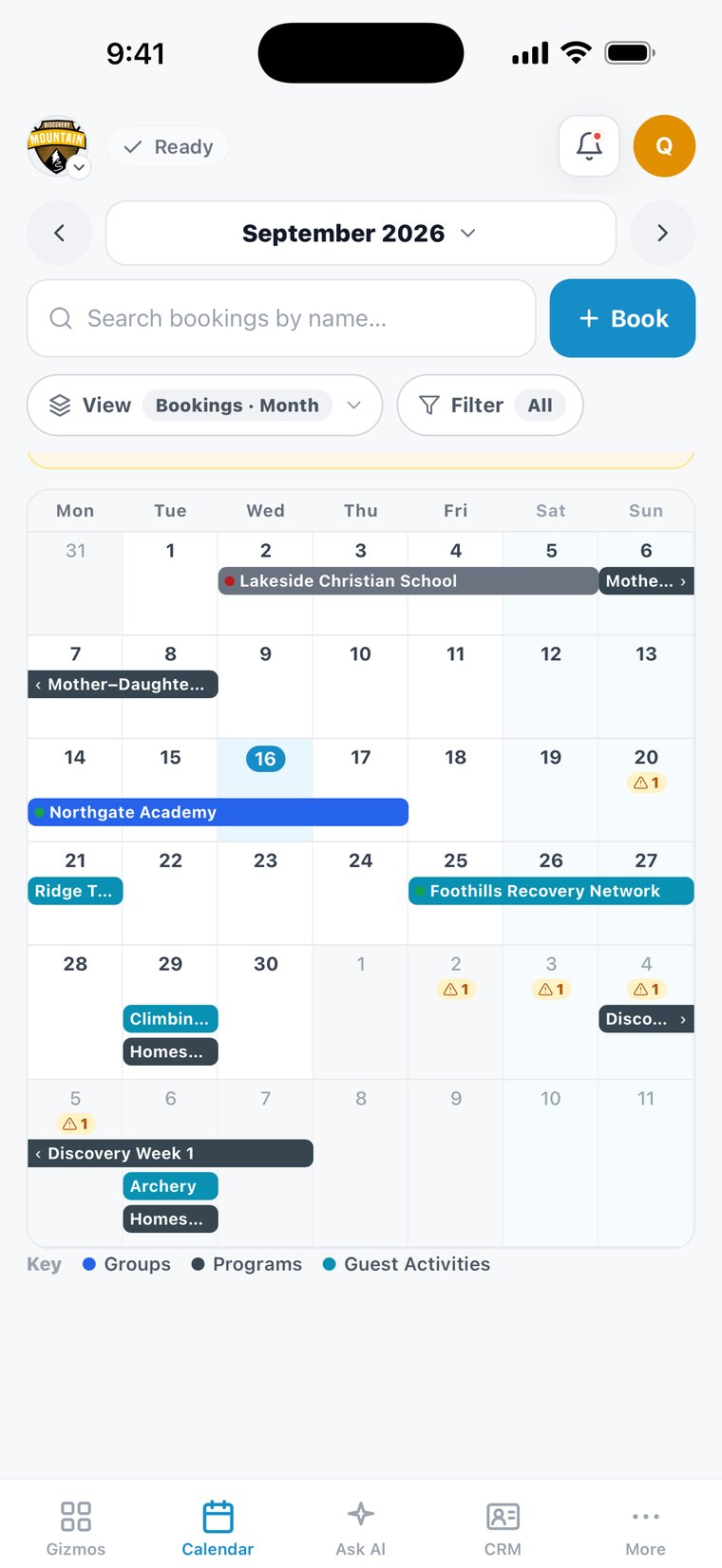
Guest Rental Group stays, program weeks, activities, housing and meeting rooms draw themselves here — each one entered once, where it lives.

The One App on a phone — the Bookings Calendar at Discovery Mountain, a September of group stays, programs and activities
  • Tonight’s plate count, straight from the group’s own meals.
  • A room out of service reads closed, with the reason.
  • Tap a bar and the whole Group Card opens.

Scheduling

It already knows how many people you need.

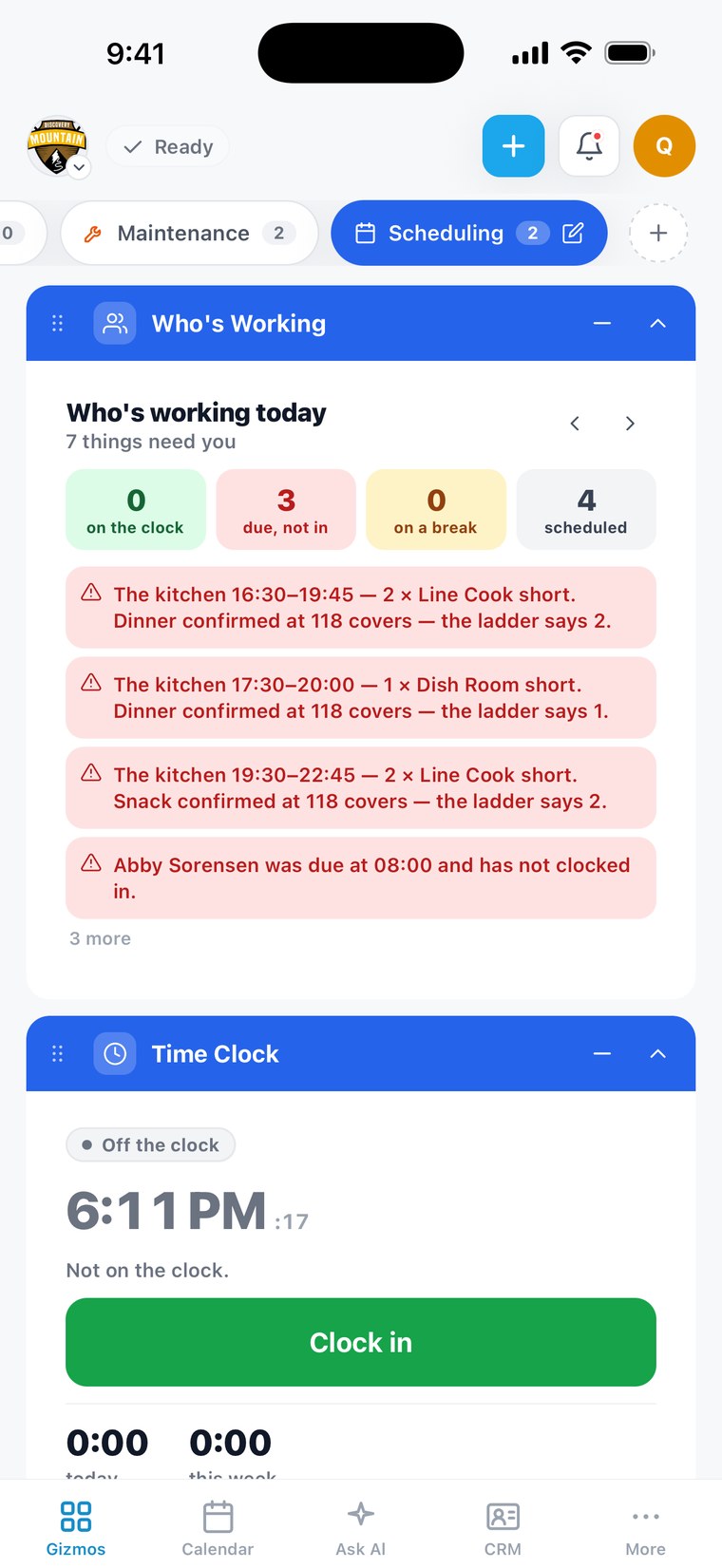
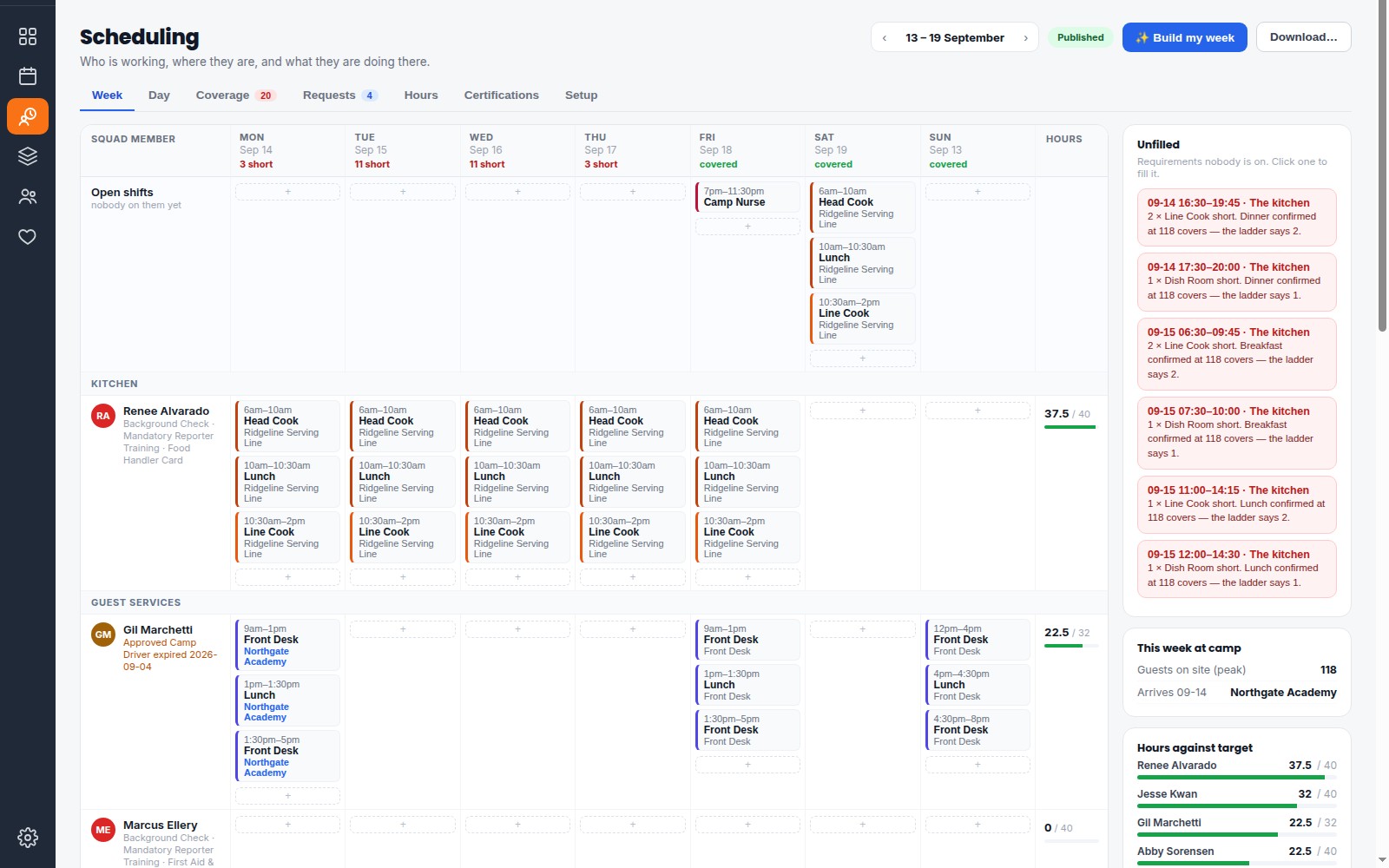
Every activity booked and every meal confirmed turns into coverage on its own — and each line says where its number came from.

Scheduling, the week view: every Squad Member’s shifts for the week, the shifts still short, and the unfilled list with the reason each one exists
  • “Dinner confirmed at 118 covers — the ladder says 2.”
  • An expired certification is refused on the shift’s date.
  • High ropes, then the kitchen, then the bonfire — one day.

Programs

One registration. The whole camp already knows.

A family finishes registering and the roster, the balance, the forms and the dietary note are already right — nobody exported anything, and nobody typed it twice.

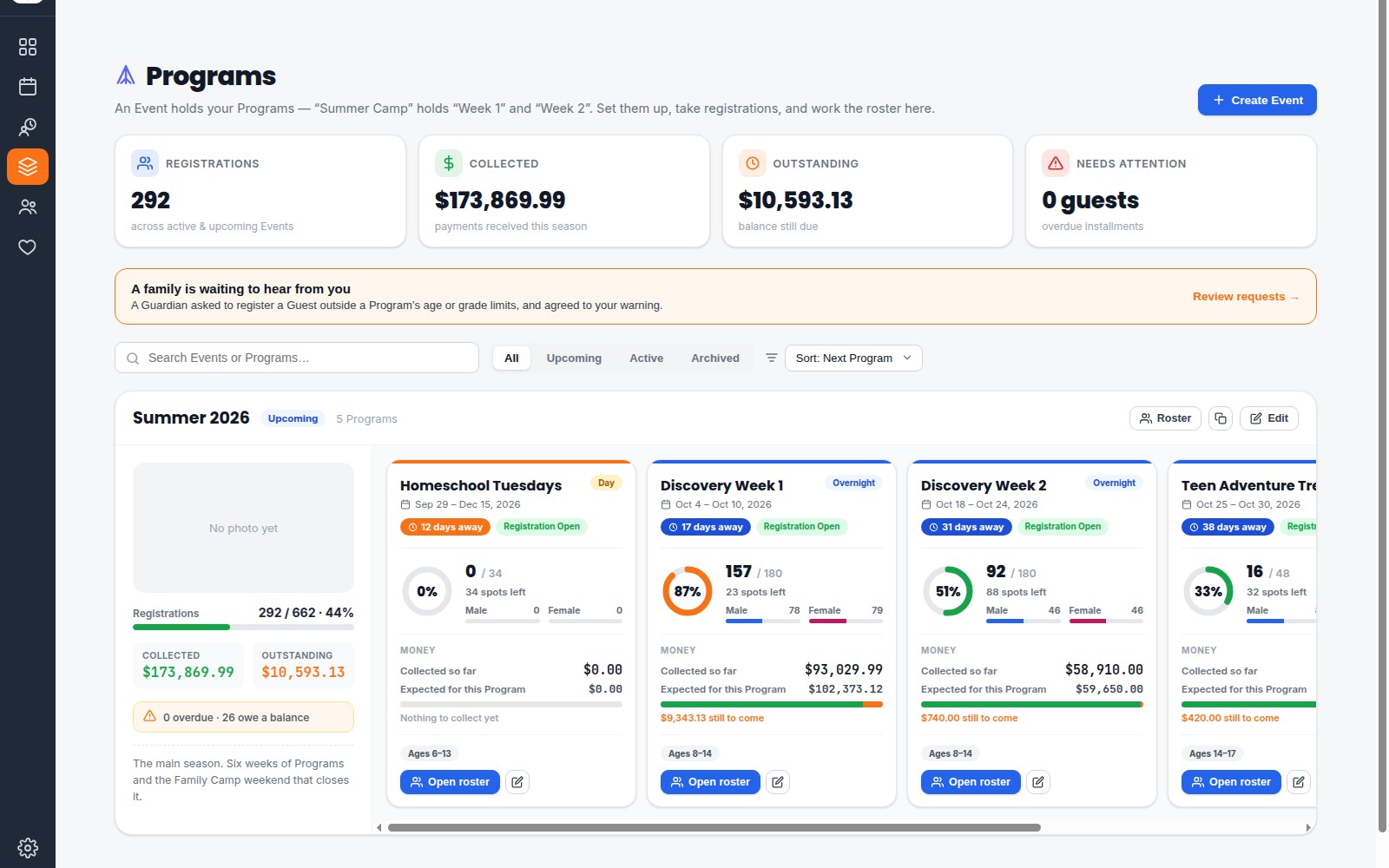
Programs at Discovery Mountain: 292 registrations, money collected and outstanding, and every Summer 2026 Program with its spots, Boys and Girls, and what is still to come
  • Forms, waivers and payment tracked per Guest.
  • Age and grade checked against your real dates.
  • Every Guest their own ticket, balance and scholarship.

Guest Rental Groups

Every Guest Rental Group, by name.

Each group registers through its own link, so the names, the beds, the forms and the balance land on the Group Card — and their Group Leader works the same record from their own Camper Portal.

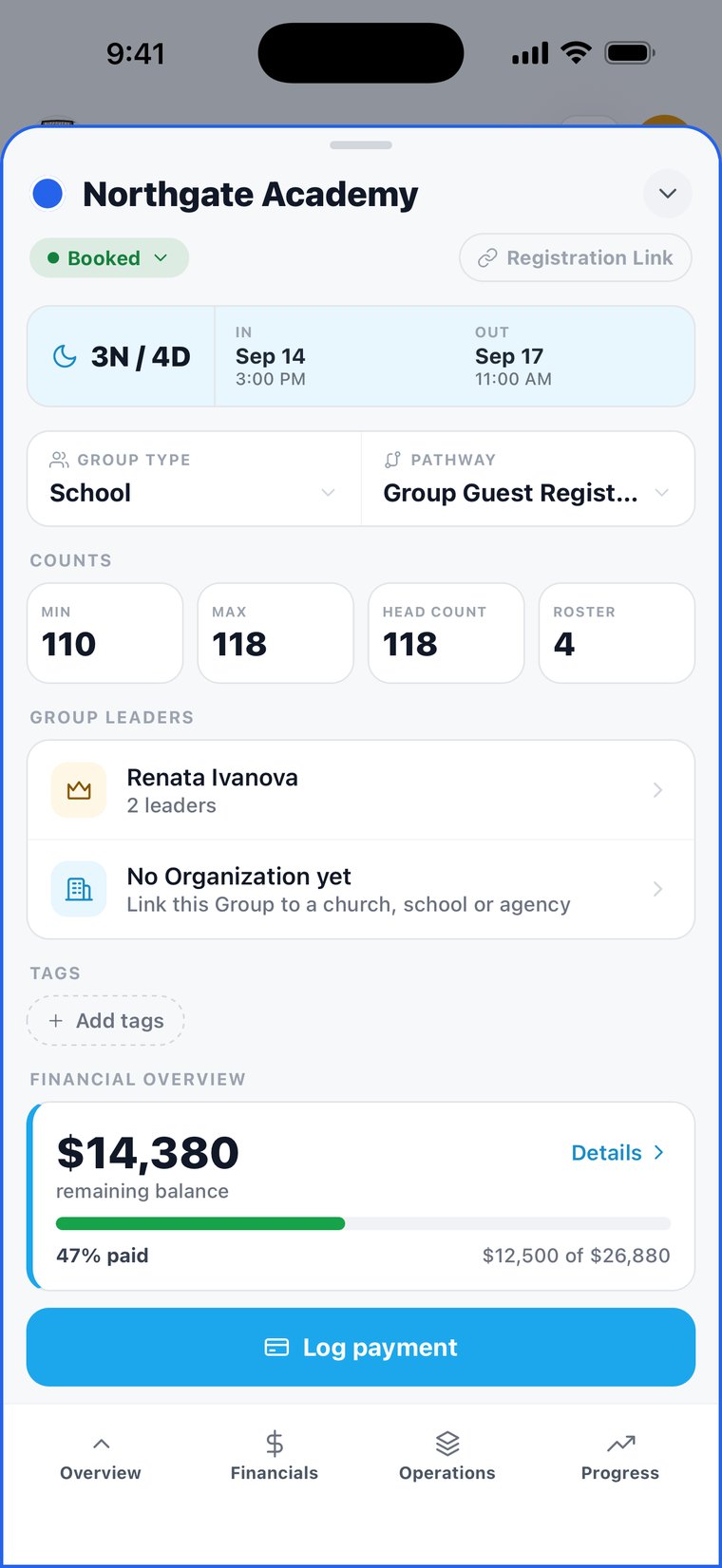
The One App on a phone — the Group Card for Northgate Academy: dates, counts, Group Leaders and the balance
  • Named Guests, each with the bed assigned.
  • Group Leaders place their own people in rooms.
  • Every leader on the card sees the same record.

One CRM

Every family in one place — not in seven.

Today the same family lives in your registration system, your donor list, your email tool and a few spreadsheets — and none of them match. In The One App each person has one record, and everything they do with you lands on it: every registration, payment, form, donation and phone call.

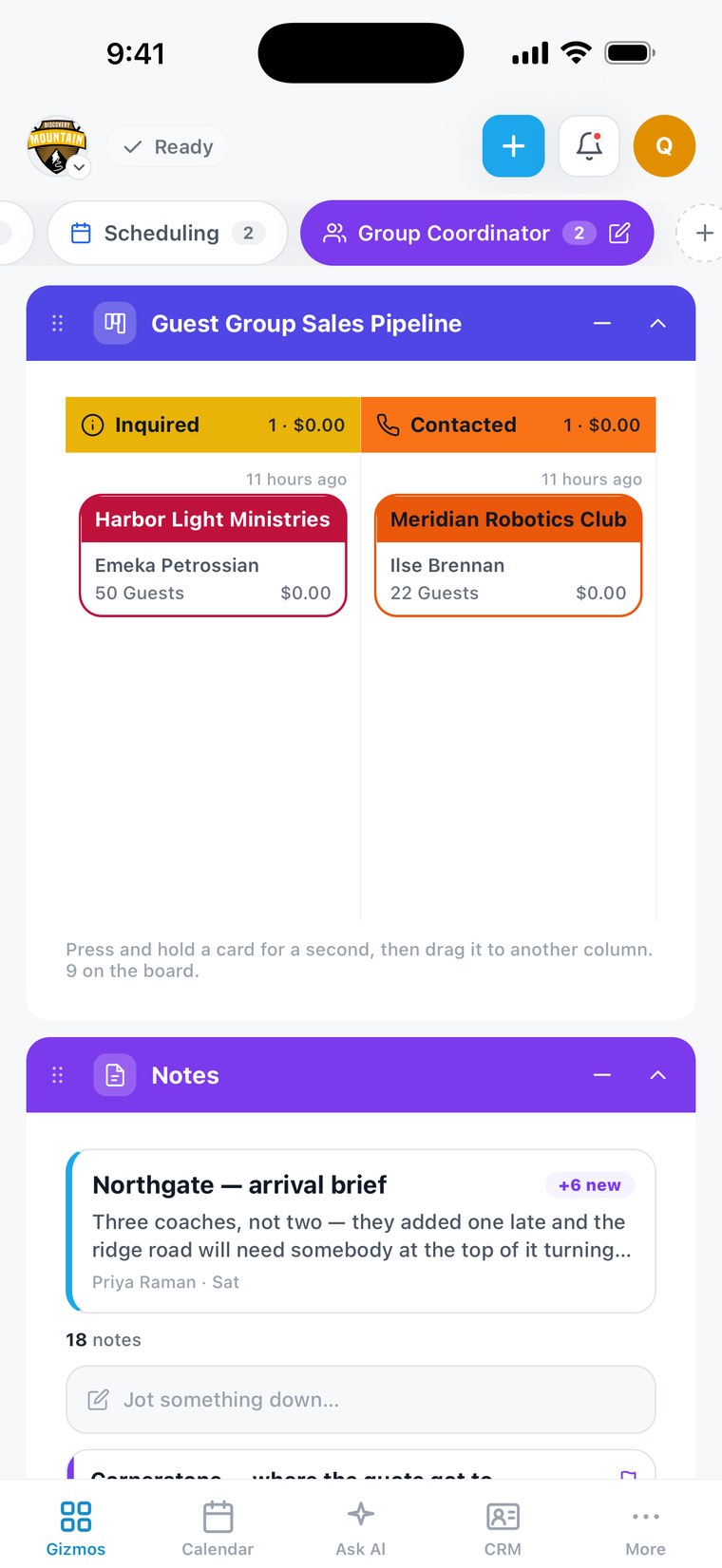
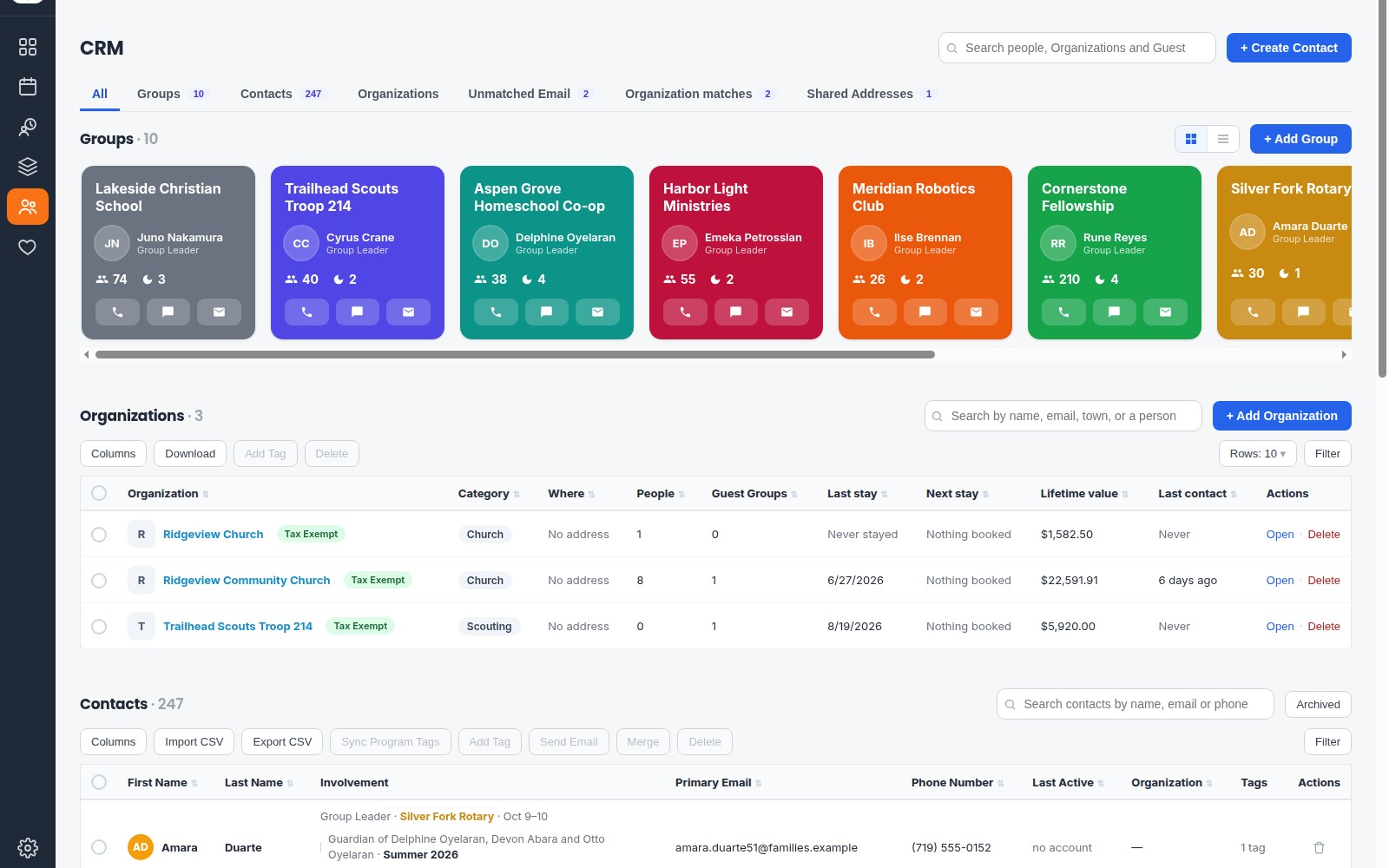
The CRM: every Guest Group, Organization and Contact in one place, each Group with its leader, headcount and one-tap call, text and email
  • Update a phone number once. It’s right everywhere.
  • See who registers, who gives, and who does both.
  • Pick up a call and already know their whole history.

Donors

Your donor is standing in your dining hall.

The same record knows the Guardian arriving Friday gave to the roof they’ll eat under — so the thank-you happens with a handshake, not a mailing.

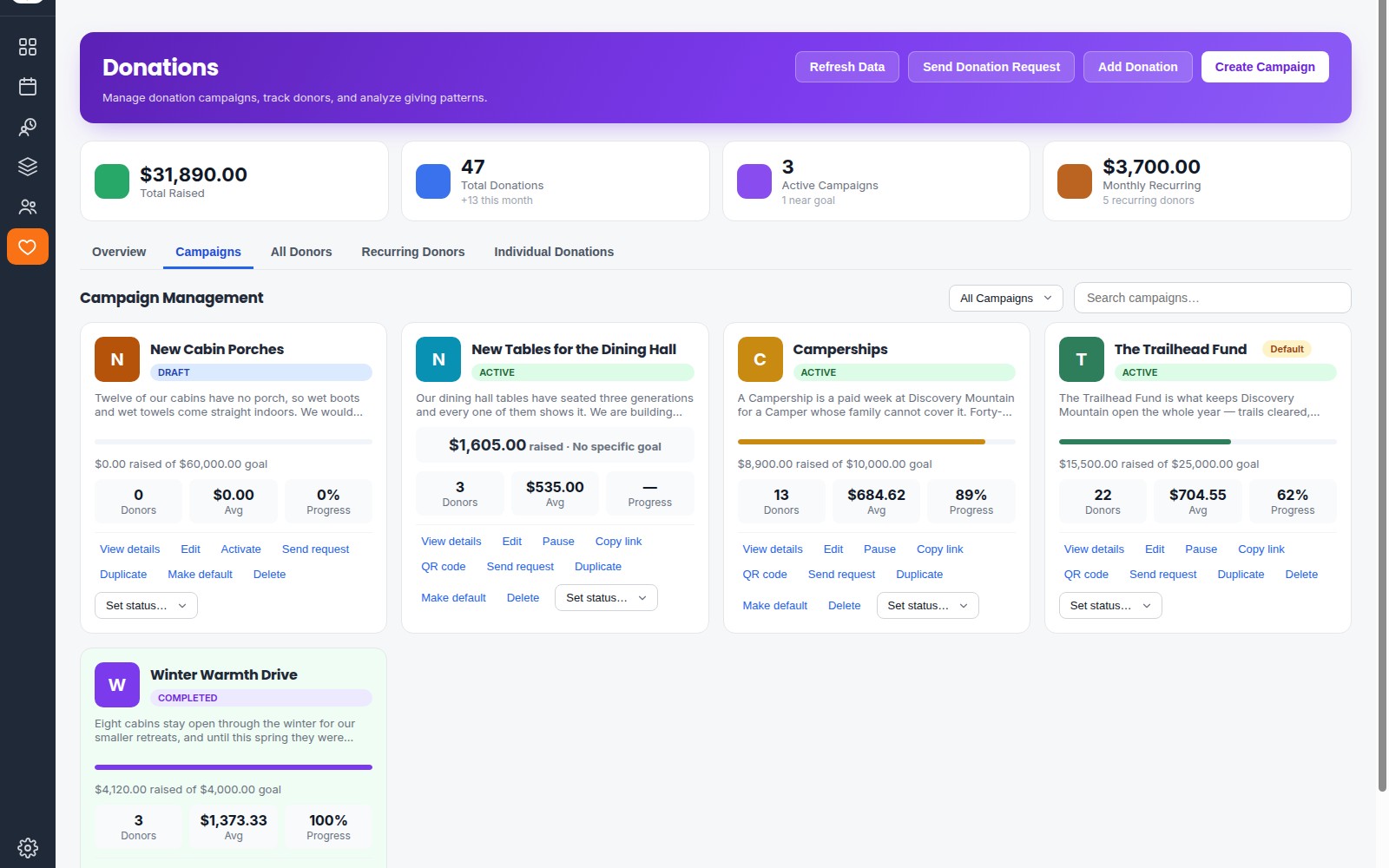
Donation campaigns at Discovery Mountain: each campaign with its goal, donors, average donation and progress
  • Your team is told when a donor arrives on site.
  • Round up at the register, straight to a campaign.
  • Every donation lands on the family it came from.

The Grow Your Camp podcast

Hear the story
of The One App.

Three years, ten camps in the first six weeks, around sixty conversations with camp leaders, and eight Retreat Centers running the beta on real campers and real money.

The whole conversation — Camp technology should work like camp works.

Michael John Stanley, Alan Brown and Lindy Pinkerton with hosts Carl Lefever and Mark P. Fisher. Season 1, episode 22. Show notes

Why one app

It works the way your brain does.

Your right hand knows what your left hand is doing. You don’t send it a message. You don’t check that it got there. You don’t keep a spreadsheet reconciling the two.

This is software for a whole Retreat Center — not software for a department.

As an example…

a simple phone call.

The phone system

You know who’s calling before you say hello.

The One App rings on your cell phone.

You know who’s calling — it’s connected to your CRM.

If they’re currently registered.

Any balance due.

Any outstanding registration requirements.

What is in their Camper Wallet

One tap sends them a link to any unfinished Forms or eDocs — while you’re still on the call.

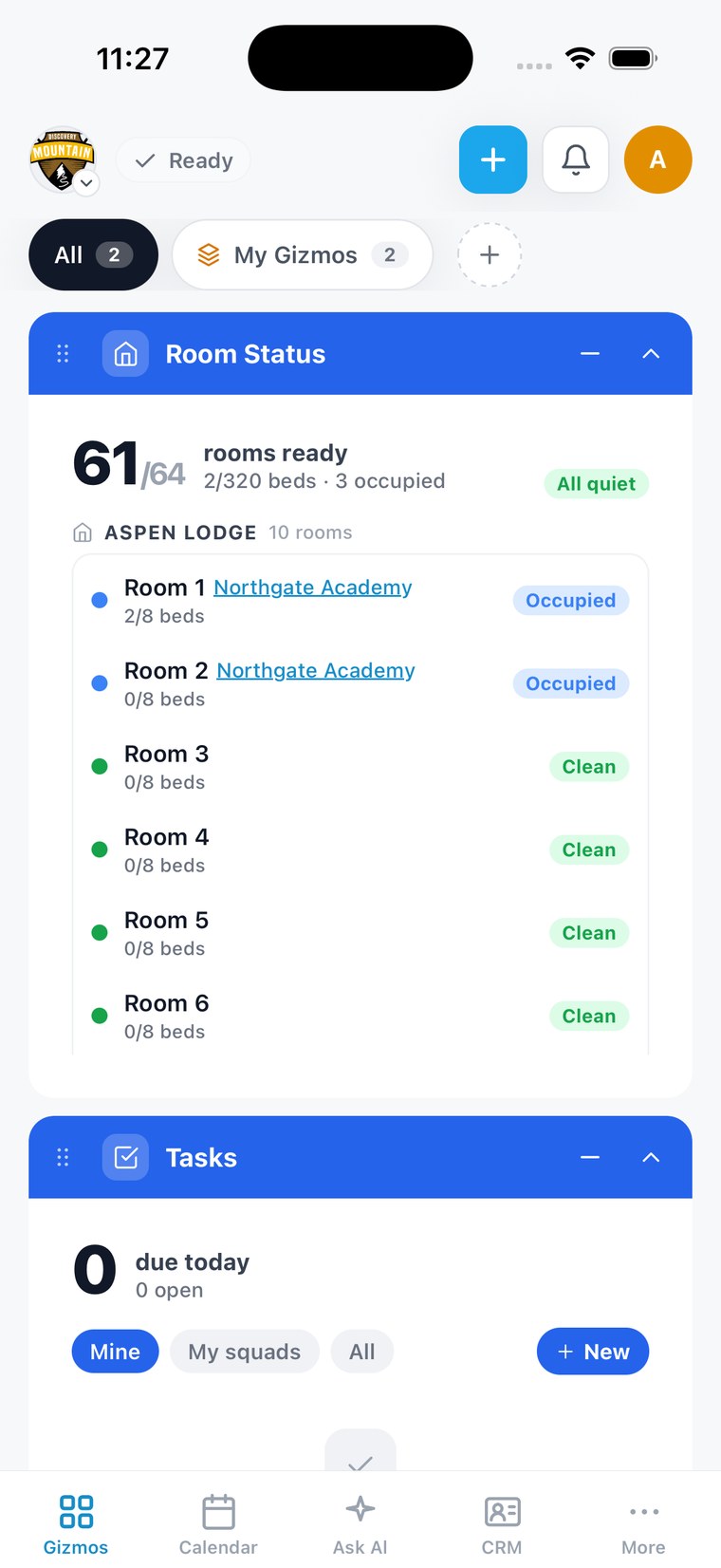
The One App on a phone — Room Status and Tasks on the home screen
Incoming call · ringing
DM
Dana Miller
Guardian · Jordan (Week 3) · Donor since 2021
Balance$340.00 due Fri
PaperworkHealth form missing
RegistrationStopped at step 3
Wallet$25.00
Text the formTake payment Back to registrationAdd a note

A phone company can make your phone ring.

It cannot tell you the woman calling is Jenna’s mom, that she owes $340, that her health form is missing and that she gave up halfway through registering — and then let you fix all four before she hangs up. That screen is assembled out of six parts of your camp in the time it takes to reach for the handset.

The CRM
turns a number into a person — and holds the whole family, so a shared mobile offers you both parents rather than guessing at one.
Billing
is the “$340 outstanding” line, and it’s the same figure your books hold, because there’s only one of it.
Forms and documents
are what’s still missing before their child can come — the same checklist the roster reads.
Registration
is where they stopped, which is why you can send them back to their own half-finished form instead of telling them to start again.
The Camper Wallet
is the balance you can settle while they’re asking about it, rather than the callback you promise and forget.
Your team and your hours
are what decided the call reached you at all — and what sends it back to you, not a dial tone, if you hand it on.

A phone company can sell you a screen pop with a name on it. Only a company that already holds the registration, the money, the paperwork and the roster can put the answer on that screen.
Another example

Scheduling that builds itself.

It builds your team’s week.
Because it already knows your week.

Scheduling software knows names and hours. It has no idea a group of 44 arrives Friday, that dinner is confirmed at 44, or whose lifeguard certification runs out before Saturday. The One App knows all of it — so it can build the week for you.

  1. It reads what’s bookedEvery group, meal and activity already on the calendar becomes the shifts you need — and says where each number came from.
  2. It knows who can do whatWho’s trained on each job, whose certifications are current on the day of the shift, who’s unavailable, and who’s near their hours.
  3. One click builds the weekThe hardest shifts are filled first. Anything it can’t fill is named with the reason — never faked.
  4. Publish, and everyone knowsEveryone scheduled is told their week is up, and every change after that reaches the person it touches.

A few more examples

Every separate app and spreadsheet costs you time, money and the right answer.

When the same people live in four apps and a stack of spreadsheets, nothing agrees. Here’s what that quietly costs — and why one system simply makes sense.

TimeTyping the same thing twice, then chasing which copy is right.
MoneyThe donor nobody thanked. The dinner over-ordered. The balance nobody chased.
Wrong informationThe printout from three weeks ago that someone is still working from.

Meet Ask Al

Don’t even open the app.

Ask Al is the assistant built into The One App. Ask it anything about your camp — who’s staying where, who’s ready for check-in, how many you’re feeding tonight — and it answers from your real records. And because Ask Al works with Siri, you don’t even have to open the app.

Ask Al, right from Siri.

Type it or say it. Siri hands your question to Ask Al, and Ask Al answers with everything it knows about your camp — while The One App stays closed.

  1. Straight to Siri“How many are we feeding in The One App?”
  2. Ask Al through Siri“Where is Jordan Miller staying?”
  3. Ask Al through Siri“Is Riley Chen ready for check-in?”
  4. Ask Al through Siri“Who can pick up Jordan Miller?”
  5. Straight to Siri“What’s left to clean in The One App?”
  • Only what you’re allowed to see. Ask Al keeps your permissions, in the app or through Siri.
  • Never changes anything by voice. If there’s something to do, Ask Al tells you and leaves it in the app.
  • Or just say it. “Hey Siri, ask The One App.”

Widgets

Or just glance at your home screen.

Any Gizmo can live on your iPhone’s Home Screen or Lock Screen, and it keeps itself current. Some widgets even act right there — mark a room clean without opening a thing.

Room Cleaning, Meal Headcount, Today at Camp, Who’s Working, My Shifts, Tasks, Weather and more. Budget figures stay hidden until your phone is unlocked.

Gizmos

No one at camp does just one job.

The cook helps at the zip line after lunch. The registrar covers the front desk when a group arrives. So The One App never locks anyone into a department — everyone builds their own screen out of Gizmos, and what they need is already on it. No menus to dig through. No reports to run. No waiting.

A Gizmo for anythingMeals, rooms, shifts, groups, weather, money — and a Custom Gizmo for whatever your camp does that nobody else does.
Live, not a reportEvery number is current the moment you look. Nothing to run, nothing to export, nothing to wait on.
A tab for every hatLine cook at 10:30, zip line at 2:00. Switch tabs in one tap — no hunting through menus.

No risk, no pressure

Still with us?
Let’s put your camp in it.

Same offer as above: half an hour, your data loaded by us, and fourteen days to decide with your own camp in front of you — the bookings, the kitchen count, the housekeeping list and the billing all running off the same records. No contract and no card.

  • We load your data
  • 14 days free
  • No contract
  • No credit card

Thirty minutes, an honest answer, and if we’re not right for you we’ll say so.

No modules. No second product.

Modules are walls between your own data.
Separate products are worse.

Two vendors don’t share a login, a list of people, or even a definition of who a person is. So the joining happens where it always happens — in a spreadsheet, by hand, at the end of a long day.

And that spreadsheet becomes the number your board sees. Not the registration system’s. Not the bank’s. The typed one.

Nobody has to remember

Stop being the person who chases.

The church group hasn’t sent their insurance certificate. Four families haven’t finished their forms. A contract went out nine days ago and came back never. Right now, somebody at your camp is holding all of that in their head.

The One App does the remembering — and stops the moment they finish, because finishing is something it can see.

Discovery Week 164 Guests · arrives Oct 12
Draft
18Guests still missing something
Wren WhitfieldGuardian · Marla WhitfieldDone · reminders stopped
Health FormPhoto Release
Eli NavarroGuardian · Rosa NavarroDone · reminders stopped
Medication Form
Hazel OkaforGuardian · Daniel OkaforDone · reminders stopped
$245.00 due
Micah LindqvistGuardian · Anna LindqvistDone · reminders stopped
Photo Release
Juniper ReyesGuardian · Carlos ReyesDone · reminders stopped
Health Form$120.00 due
Owen CastellanoGuardian · Tessa CastellanoDone · reminders stopped
Emergency Contacts
Ada BrennanGuardian · Liam BrennanDone · reminders stopped
Health Form
Theo ParkGuardian · Grace ParkDone · reminders stopped
Photo ReleaseHealth Form

+ 10 more

Nobody on your team is keeping this list.

It sees the finish lineForms, eDocs and payments live in the same system, so the reminders stop the moment a family is done — no list to update.
Only the ones who need itThe family that finished last night never gets this morning’s text. The one who hasn’t does.
A person, when it mattersA week out and still missing something? Your Registrar gets a nudge to call — two calls, not forty.

Your team is amazing, and it comes together as one.

One experience for your Guests.

Your software should too.

Pathways

How many apps should
a family need? One.

Stop sending your Guests six places to register. The Program, the forms, the signatures, the payment and the spending money run in order, in one place — for every Guest in the family at once.

You build the path once. Every family walks the same one.

Camper Portal

Everyone gets their own Camper Portal.

Parents and Guardians see their crew. Group Leaders run their group. Group Members see their trip. One Camper Portal — curated for whoever is looking, in your camp’s colors, with your logo.

this whole section is in Discovery Mountain’s colors — yours will be in yours

For the family…

  • Everyone they’re responsible for, together
  • What’s left, in order, with one button each
  • Payments and the Camper Wallet, no surprise fees

For the Group Leader…

  • Who’s ready and who isn’t — live
  • One tap to remind the ones who aren’t
  • Their own forms, eDocs and pricing

For each Group Member…

  • Their room and their itinerary
  • Notes from their Group Leader
  • Only their own details — never anyone else’s

For groups

Group Leaders add what their Organization needs.

A youth group needs a permission slip. A school needs its code of conduct signed and a bus fee collected. The Group Leader builds those right in their Camper Portal — and every member still walks one Pathway.

Discovery Mountain gets

  • Maya’s Health Form and signed Liability Waiver
  • Its own bill for the group, paid separately
  • Her health answers — and they stay here

Grace Youth Group gets

  • Her Permission Slip and Code of Conduct answers
  • Her $210.00, paid out to the organization’s bank every Thursday
  • Never her health answers

No separate links. No spreadsheet of who sent what. Nobody chasing anybody.

What it runs

Camp software that happens
to include registration.

Everything below is one product. There is no other list to check, and nothing here is an add-on.

Online registrationCard & ACH paymentsMeal headcountsPayment plansTime clockWaitlistsMaintenance requestsMeeting room bookingProgram rostersEarly-bird pricingDiscount codesCertificationsCaller ID on your cellGroup itinerariesAge & grade limitsGuest photosReminders that send themselvesRefundsWeather alertsCalendarChannel chatGizmos
Guest Rental GroupsTeam schedulingDonation campaignsGroup sales pipelineCamper WalletGroup contractsScholarshipsDietary & allergiesBuild my weekGroup Leader portalProgram itinerariesBunk assignmentsCustom formsRotationsApple Pay & Google PayInvoicesLodging & bedsSquads & permissionsPayoutsPercent to budgetSiri & widgetsDownload to Excel or PDF
Roommate requestsCamper MailRoom assignmentsHealth formsHousekeepingeDocs & e-signaturesCamper PortalRecurring donationsCamp StoreRoom statusDonation receiptsDepositsTasksOnline giving pageWho’s workingCRMActivity bookingBlackout datesNotesAsk AlCamp map
Online registrationTeam schedulingRoom assignmentsTime clockGroup contractsCamper PortalProgram rostersGroup Leader portalDonation receiptsCaller ID on your cellRotationsWho’s workingReminders that send themselvesSquads & permissionsNotesChannel chatDownload to Excel or PDF
Guest Rental GroupsCamper MailPayment plansCamper WalleteDocs & e-signaturesMeeting room bookingBuild my weekRoom statusCertificationsCustom formsOnline giving pageGuest photosLodging & bedsBlackout datesCalendarSiri & widgets
Roommate requestsMeal headcountsGroup sales pipelineHousekeepingMaintenance requestsDietary & allergiesCamp StoreDiscount codesBunk assignmentsTasksAge & grade limitsInvoicesActivity bookingWeather alertsPercent to budgetCamp map
Card & ACH paymentsDonation campaignsHealth formsWaitlistsScholarshipsRecurring donationsEarly-bird pricingProgram itinerariesDepositsGroup itinerariesApple Pay & Google PayCRMRefundsPayoutsAsk AlGizmos

If it happens at camp, it lives here.

In their words

From our Retreat Centers

“Housekeeping, dining hall, facilities, retreats, programs, donors, overnight camp, day camp, everything is running from this one platform.” Taylor Belt · Director of Retreats, Forest Glen Camp & Retreats, Huntsville, TX
Twenty years of separate systems, now one app. Paul Biles · Executive Director, Tejas Ministries, Inc., Giddings, TX See the original post on Facebook

“It’s like going from a Go-Kart to a Ferrari!”

Reagan McQueen · God’s Farm / Atlanta Youth Project, GA

“Our admins workload got cut down to 1/3 of pre one app. I was looking for a software engineer to design an app for us because I was so tired of all these systems not integrating, then I stumbled on the one app, and it’s more than I dreamed of. This is the app every camp needs!”

Jason McQuinn · Bear Paw Camp

“Before the switch we had to enter details in triplicate and often found mistakes in the process. The One App’s systems are so intuitive that mistakes are hard to make. … They are great at anticipating and fulfilling the needs of the camps they serve.”

Evan Carey · Guest Services and Reservations Manager, Singing Hills Christian Camp

Why any of this works

Everyone else assembles a camp out of parts.
We engineered it as one thing.

A company that sells registration can sell you registration. A company that sells donor software can sell you that. Neither can tell you the family checking in on Friday gave to the roof fund in November — not because they haven’t got round to it, but because the two halves live in different companies’ software, and always will.

Everything you have just seen comes out of the same records. That is not a feature we added. It is the decision the whole thing was built on, and it is the one decision a competitor cannot copy without starting again.

One camp. One system. One set of records.

Book a tour

See it on your own
camp’s calendar.

Thirty minutes. A real look at your own camp inside the app, and a straight answer about what switching would take.

Or call us — (833) 409-0033

Please add your name, your camp’s website and an email so we can reach you.

We will set your camp up for you. Send us what you run camp on today — your groups, your programs, your rates, your people — and we load it in.

Then it is free for fourteen days. Two weeks in the real app, with your own camp already in it, before you decide anything.

And there is no contract. No term you have to commit to. You are free to leave anytime, and if it isn’t right for your camp you don’t have to stay.

No pressure. If we’re not right for you we’ll say so.

✓

Got it. Now pick a time.

Choose a time for your demo below and it lands on our calendar. Rather talk now? Call (833) 409-0033.

See why one app wins+
Book a tourCall